واو و Zoom
يقدّم واو إعداد الداعمة المحدودة، سجل تجاري رقم 7009115556، المملكة العربية السعودية. للدعم: admin@yallawaw.com
ماذا يفعل واو مع Zoom؟
واو مساعد للفريق على واتساب. عندما يربط مدير الفريق حسابه في Zoom:
- يحضر واو اجتماعات Zoom التي يحضرها المدير ليدوّنها، حتى لو كان الاجتماع من حساب شركة أخرى. يدخل باسم «واو · Waw notes» ويكتب في دردشة الاجتماع أنه يدوّنه للمدير، ويخرج إذا خرج المدير.
- يجلب تسجيل اجتماع انتهى عندما يرسل المدير رابط تسجيله السحابي.
- يلتقط التسجيلات السحابية لاجتماعات المدير بعد انتهائها (للاجتماعات التي تنتهي بعد الربط فقط).
بعد كل اجتماع يصل المدير على واتساب ملخص وقرارات ومهام مقترحة، ولا يُرسل شيء للفريق قبل موافقته.
البدء
- أضف واو لفريقك وكن مدير الفريق (من yallawaw.com).
- أرسل لواو على واتساب: اربط زوم (أو من التطبيق: الإعدادات ← الإيميل والاجتماعات الأونلاين ← Zoom ← ربط).
- سجّل الدخول في Zoom ووافق على الأذونات. يصلك تأكيد على واتساب.
الاستخدام
- لحضور اجتماع: أرسل رابطه لواو (مثل https://zoom.us/j/…) وادخل الاجتماع أنت أيضاً، ثم اسمح لواو بالدخول إن ظهر في غرفة الانتظار.
- لاجتماع انتهى: أرسل رابط التسجيل (…/rec/share/…).
أين تظهر محاضر الاجتماعات
كل اجتماع يعالجه واو (حضره، أو أُرسل رابط تسجيله، أو التقط تسجيله السحابي) يظهر في تطبيق واو على yallawaw.com/app، ويصل المدير على واتساب أيضاً.
- في الرئيسية اضغط زر اجتماع العائم أسفل الشاشة.
- انزل إلى اجتماعاتك: كل اجتماع، الأحدث أولاً، بمدته وعدد مهامه.
- اضغط الاجتماع لترى الملخص والقرارات ومهمة كل شخص.
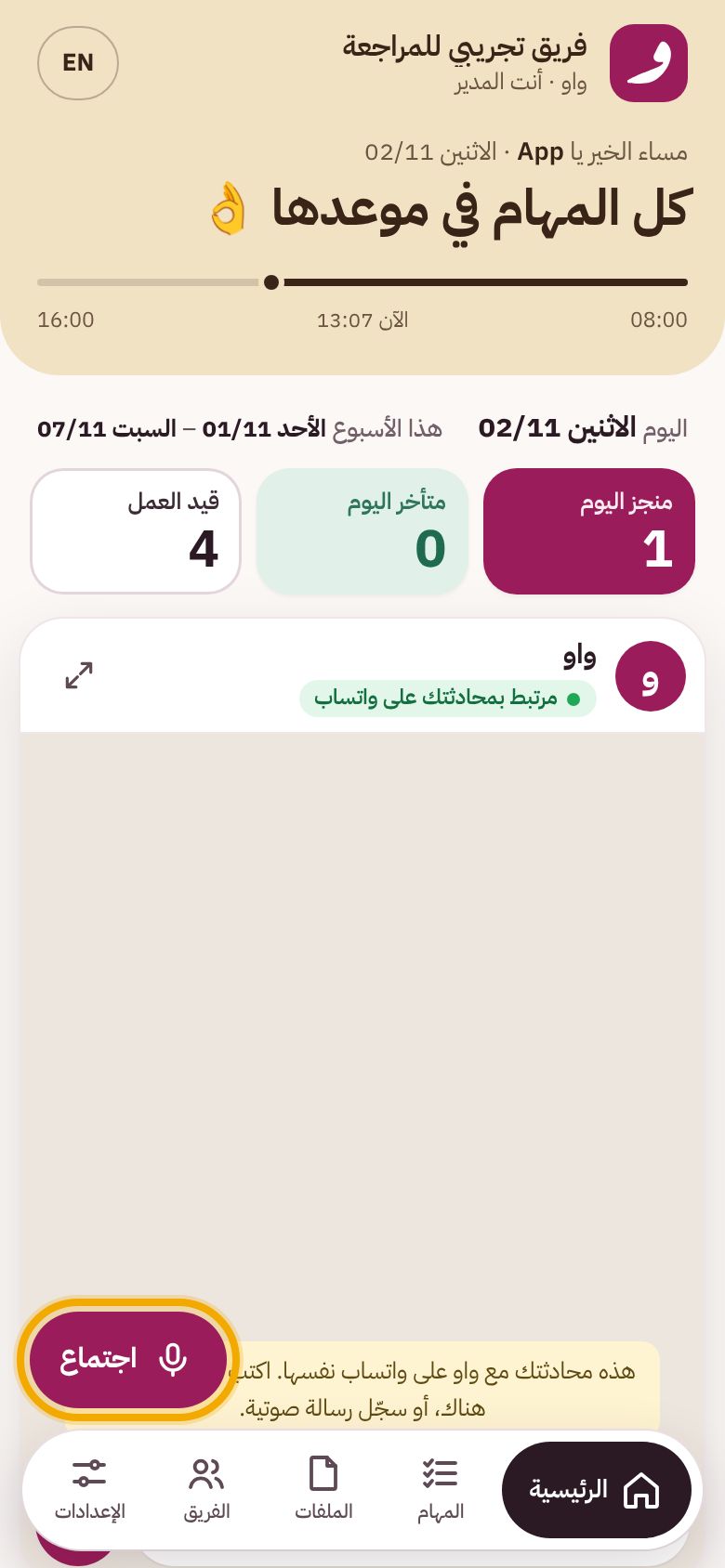
١. الرئيسية ← اجتماع 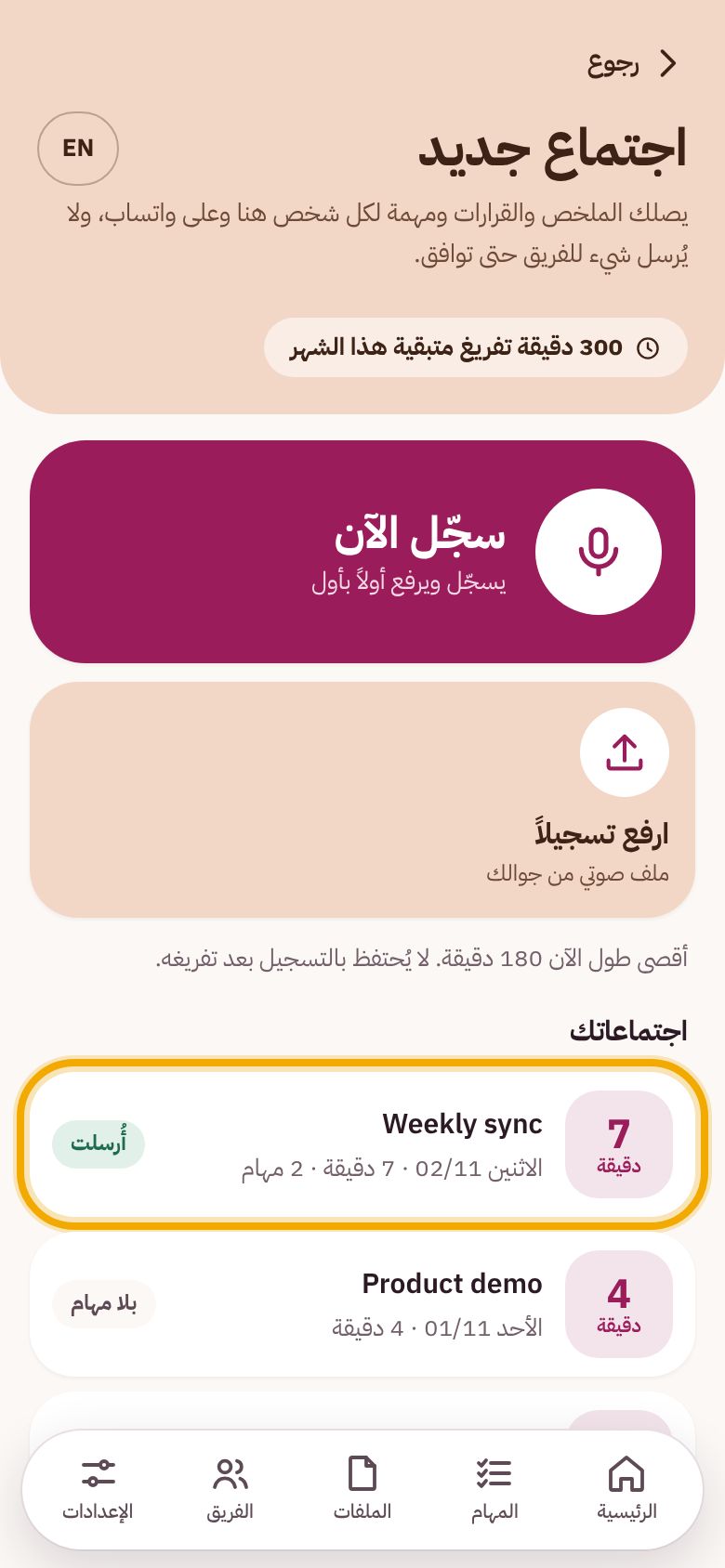
٢. اجتماعاتك 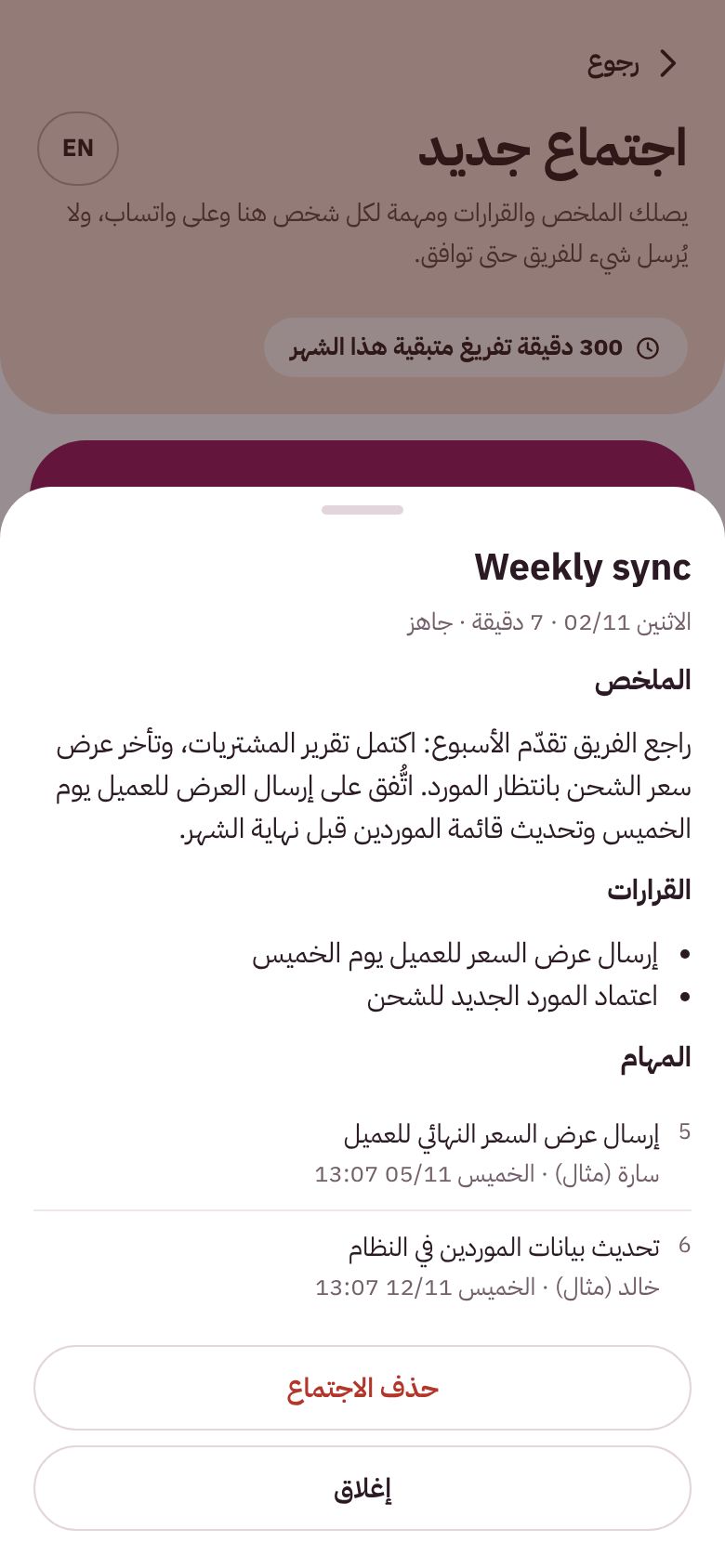
٣. محضر الاجتماع
يظهر التسجيل السحابي بعد دقائق من انتهاء Zoom من تجهيزه. الاجتماع القصير بلا مهام يظهر «بلا مهام» مع ملخصه.
الأذونات التي يطلبها واو ولماذا
- user:read:user: معرفة بريد حسابك ومعرّفه لعرض الحساب المربوط وفصله.
- user:read:token: إذن Zoom المؤقت لدخول واو الاجتماع باسمك (يطلبه Zoom منذ 2026 لاجتماعات الحسابات الأخرى).
- cloud_recording:read:list_user_recordings و cloud_recording:read:recording: إيجاد التسجيل السحابي المطلوب وتنزيل صوته لتفريغه.
البيانات
يُنزَّل صوت الاجتماع ويُفرَّغ إلى نص ثم يُحذف التسجيل. يبقى النص والملخص والمهام في فريقك حتى يحذفها المدير. مفاتيح ربط Zoom مشفّرة. التفاصيل في سياسة الخصوصية.
الفصل والإزالة
- من واو: أرسل افصل زوم، أو من التطبيق: الإعدادات ← Zoom ← فصل.
- من Zoom: سجّل الدخول إلى marketplace.zoom.us ← Manage ← Added Apps ← واو (Waw) ← Remove.
عند الإزالة من Zoom يتوقف واو فوراً عن الوصول إلى حسابك، ونحذف مفاتيح الربط وأي تسجيل Zoom محفوظ لدينا، ونخبرك على واتساب. ملخصات الاجتماعات ومهامها التي وافقت عليها تبقى في فريقك، ويمكنك حذفها أو حذف كل بياناتك في أي وقت (الطريقة).
Waw for Zoom
Waw is provided by Mohamad Hamid Chalak (Idad Al Daima Ltd), CR No. 7009115556, Saudi Arabia. Support: admin@yallawaw.com
What Waw does with Zoom
Waw is a team assistant on WhatsApp. When a team manager connects their Zoom account:
- Waw attends the Zoom meetings the manager attends to take notes, including meetings hosted by other companies. It joins as "واو · Waw notes", posts in the meeting chat that it is taking notes for the manager, and leaves when the manager leaves.
- It fetches the recording of a finished meeting when the manager sends its cloud-recording link.
- It picks up the manager's cloud recordings after their meetings end (only meetings that end after connecting).
After each meeting the manager gets a summary, decisions and suggested tasks on WhatsApp; nothing reaches the team before they approve.
Getting started
- Add Waw to your team as its manager (at yallawaw.com).
- Send Waw on WhatsApp: اربط زوم ("connect Zoom"), or in the app: Settings → Email and online meetings → Zoom → Connect.
- Sign in to Zoom and approve. You get a confirmation on WhatsApp.
Using it
- To have Waw attend a meeting: send it the link (e.g. https://zoom.us/j/…) and join the meeting yourself; admit Waw if it waits in the waiting room.
- For a finished meeting: send the recording link (…/rec/share/…).
Where the meeting notes appear
Every meeting Waw processes (one its note-taker attended, a recording link, or a cloud recording it picked up) appears in the Waw app at yallawaw.com/app, and the manager also gets it on WhatsApp.
- On Home, tap the floating Meeting button at the bottom of the screen.
- Scroll to Your meetings: every processed meeting, newest first, with its length and how many tasks it produced.
- Tap a meeting to open its summary, decisions and the task for each person.
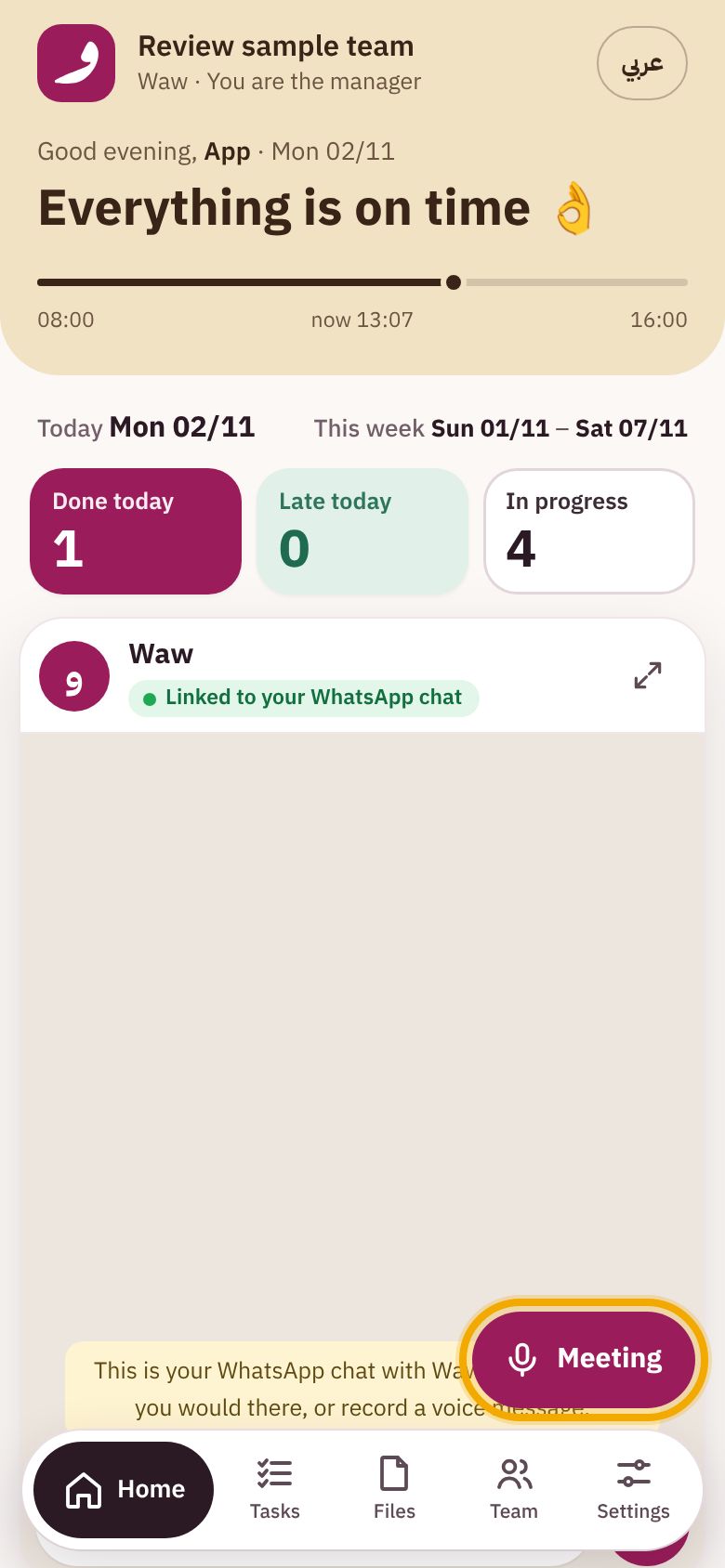
1. Home → Meeting 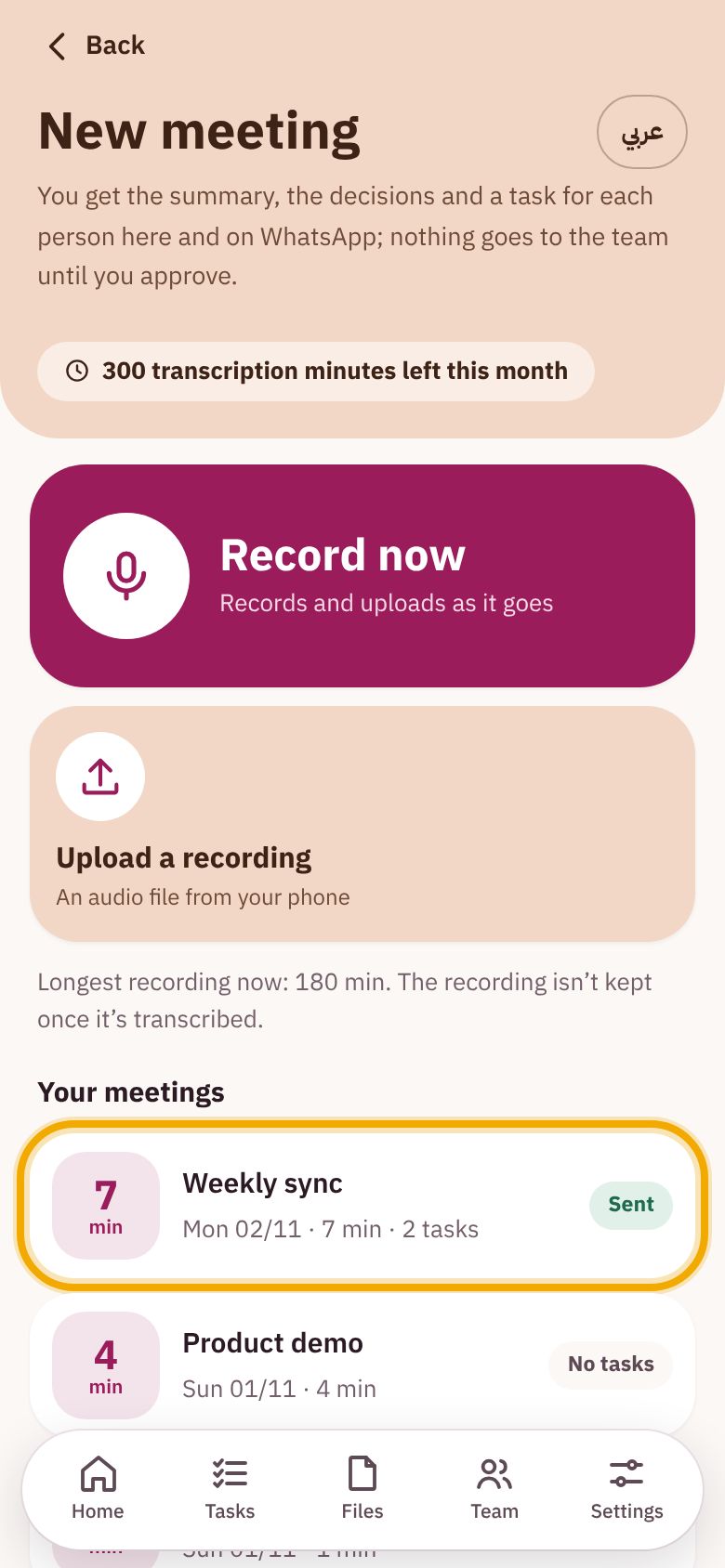
2. Your meetings 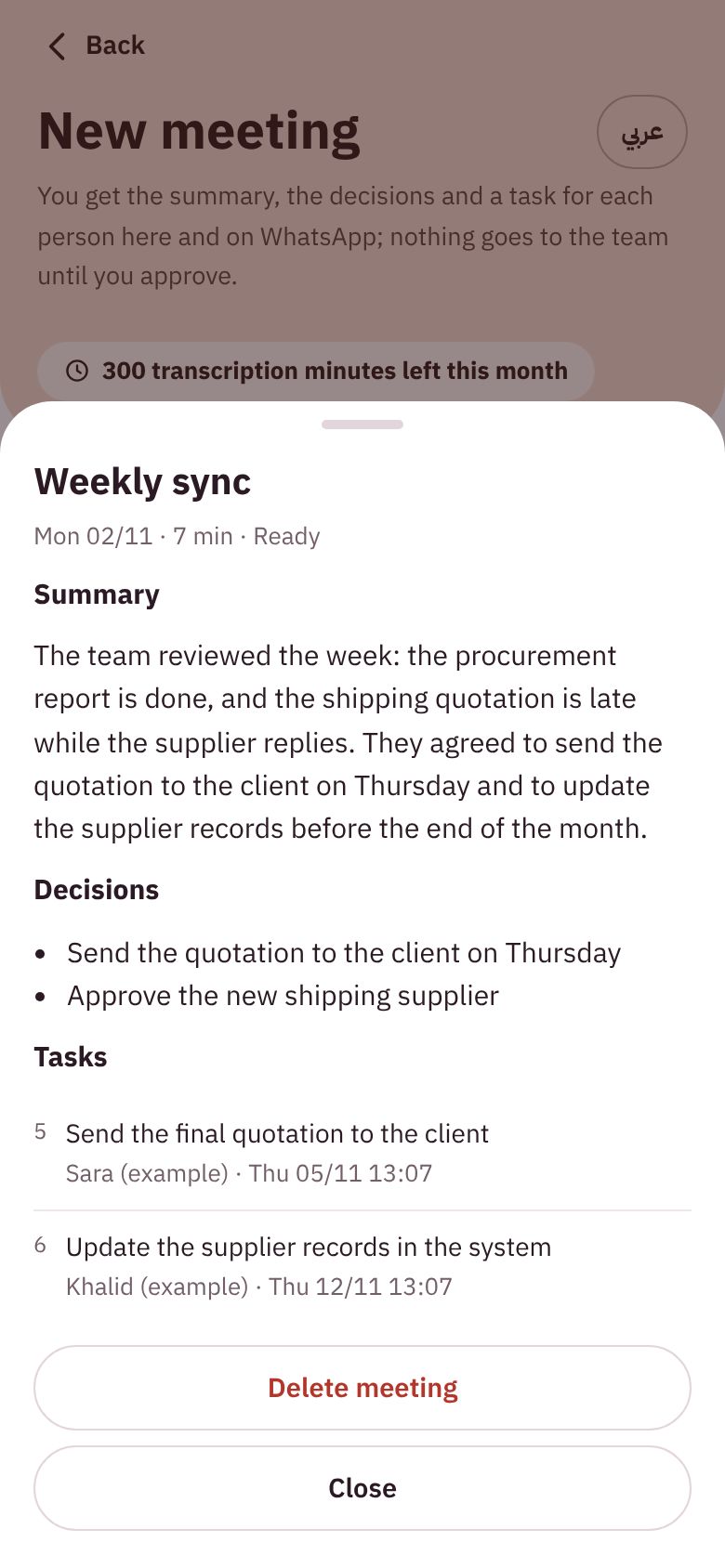
3. A meeting's notes
A cloud recording appears a few minutes after Zoom finishes processing it. A short meeting with no action items is listed as "No tasks", with its summary. The screens above are the app in English, as the review account shows it, with its notes in English; Arabic-speaking teams get the app and the notes in Arabic.
Permissions Waw asks for, and why
- user:read:user: your account's email and id, to show and disconnect the connected account.
- user:read:token: Zoom's short-lived "on behalf of" token so Waw can join a meeting on your behalf (required by Zoom since 2026 for meetings hosted by other accounts).
- cloud_recording:read:list_user_recordings and cloud_recording:read:recording: to find the requested cloud recording and download its audio for transcription.
Data
A meeting's audio is downloaded, transcribed to text and then deleted. The transcript, summary and tasks stay with your team until the manager deletes them. Zoom connection tokens are stored encrypted. Details in the Privacy Policy.
Disconnecting and removing
- In Waw: send افصل زوم ("disconnect Zoom"), or in the app: Settings → Zoom → Disconnect.
- In Zoom: sign in at marketplace.zoom.us → Manage → Added Apps → Waw → Remove.
When you remove Waw in Zoom, Waw stops accessing your account immediately; we delete the connection tokens and any Zoom recording file we still hold, and tell you on WhatsApp. Meeting summaries and tasks you approved stay with your team; you can delete them, or all your data, at any time (how).